Skip to Content
Cloud One Zambia
  • Home
  • Solutions

    BUSINESS COMMUNICATION SUITE


    Managed Business Communication Suite Self Managed Business Communication Suite

    SIP TRUNKS in zambia


    Bring Your Own Carrier (BYOC) SIP Trunk Country Presence / International SIP Trunk
  • Communication Suite Training

    Communication suite training


    User Training Operator Training Call Centre Agent Training Call Centre Supervisor Training
  • Yealink Solutions

    Yealink uc solutions in zambia


    Yealink IP Phones Yealink BYOD Video Conferencing Systems Microsoft Teams Rooms Systems Zoom Rooms SystemsYealink Headsets
  • Shop
  • Contact us
  • Blog
  • Sign in
  • 0
  • Deploy in Hours Certified Experts Zero Setup /License Fees*
  • Follow us
Cloud One Zambia
  • 0
    • Home
    • Solutions
    • Communication Suite Training
    • Yealink Solutions
    • Shop
    • Contact us
    • Blog
  • Deploy in Hours Certified Experts Zero Setup /License Fees*
  • Follow us
  • Sign in
  1. All products
  2. Brands
  3. Yealink
  4. Video Conferencing Solutions
  5. VC Accessories
  6. Yealink VCR20 Remote control
  7. VC Accessories
Pricelist: NO PRICES Pricelist
NO PRICES
Pricelist: NO PRICES Pricelist
NO PRICES
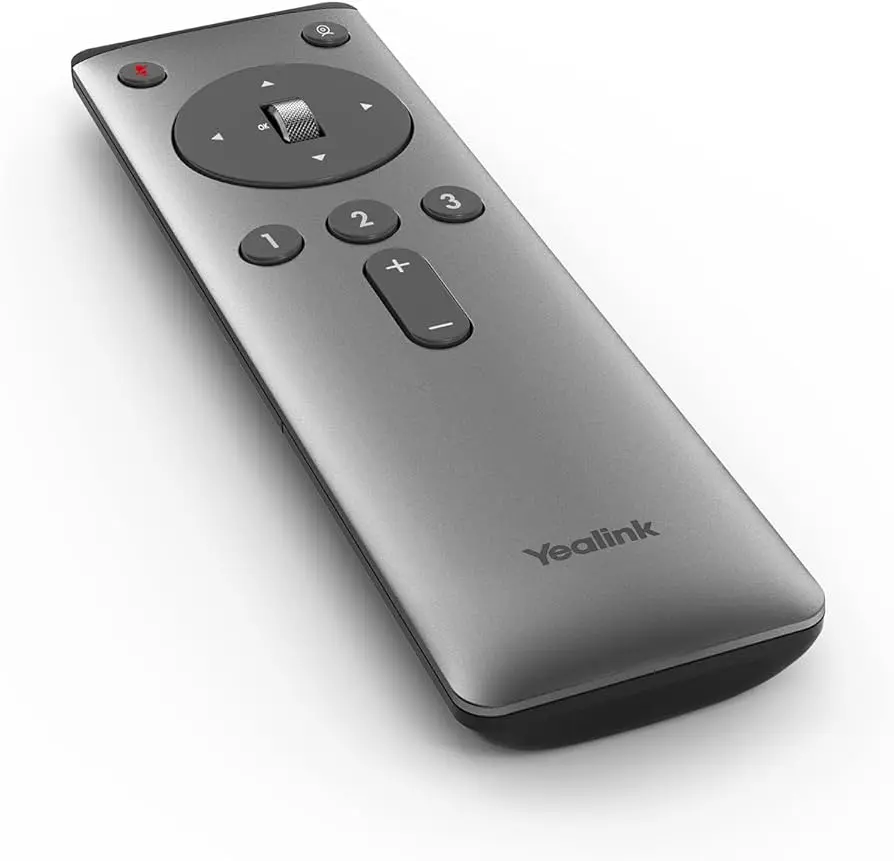
Yealink VCR20 Remote control

Yealink VCR20 Remote control

The Yealink VCR20 Remote Control enhances video conferencing with intuitive buttons for essential functions. Control microphone audio, select camera tracking modes, zoom, pan, tilt, adjust volume, and save camera positions for streamlined meetings.

Yealink Kenya Yealink VCR20
0.00 KSh 0.00 KSh
15,450.00 KSh

Add to cart
Terms and Conditions
30-day money-back guarantee
Shipping: 2-3 Business Days
Contact Us

Yealink VCR20 Remote Control

The Yealink VCR20 Remote Control is a versatile accessory designed for use with Yealink video conferencing systems. This compact device features six intuitive buttons: Mute, Tracking Feature, OK, Navigation, Number, and Volume. The Mute button silences or reactivates the microphone, while the Tracking Feature button allows users to select between different automated camera tracking modes. The OK button serves multiple functions, including zooming in or out on the camera image and confirming selections. The Navigation button provides precise control over camera panning and tilting, enabling users to adjust the field of view as needed. The Number button facilitates the creation and modification of preset camera positions, streamlining frequent camera adjustments. Finally, the Volume button conveniently adjusts the audio output level for optimal listening experience. This user-friendly remote control enhances the functionality and ease of use of Yealink video conferencing systems, empowering users with greater control over their meetings.

Alternative Products

These other products might interest you

Useful Links
  • Home
  • About us
  • Products
  • Services
  • Shipping
  • Return Policy
  • Warranty
Legal
  • Terms
  • Privacy
  • Shared Responsibility
  • Service Level Agreement
About us

Cloud One Limited is a leading telephony service provider established in 2017. we offer reliable and secure cloud and on premise telephony solutions, including SIP trunks, Yealink IP phones, and VPS hosting within our Tier 3 data center infrastructure.

Our mission is to revolutionize cloud communications by providing unparalleled reliability, cutting-edge innovation, and substantial cost savings. We deliver a stress-free, always-available service experience that empowers businesses to thrive in the digital age.

Connect with us
  • Contact us
  • hello@cloudone.co
  • +254207900000
Follow us